

Learn Avistry, and Unity with it.
A short course inside the tool, a glossary of every word it uses, and a look at each tool at work.
Six tiers.
From the first click to baked maps.
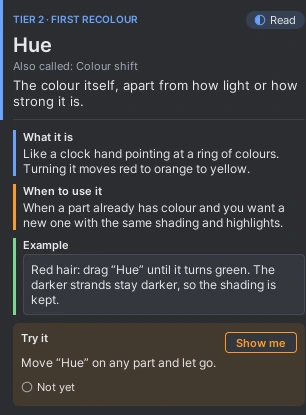
Start it in Unity.
- Open Tools > Avistry > Textures.
- Press Start the skill tree in the New to Unity? note at the top of the window. It opens the first thing to try.
- Or open the ? Help menu and choose Glossary and skill tree. Pick a skill, read the card and press Show me to try it.
Progress is kept on your computer only, with medals for each tier. Reset skill progress clears it.
Stuck? Ask on Discord.
Struggling with Avistry or with Unity itself? Ask in our Discord. Other creators and the maintainers help out, and no question is too small.
See each tool at work.
Each one has a short loop on the features page.